








Based on 140+ reviews
Trusted by local and international businesses

































cPanel is our
standard control panel.
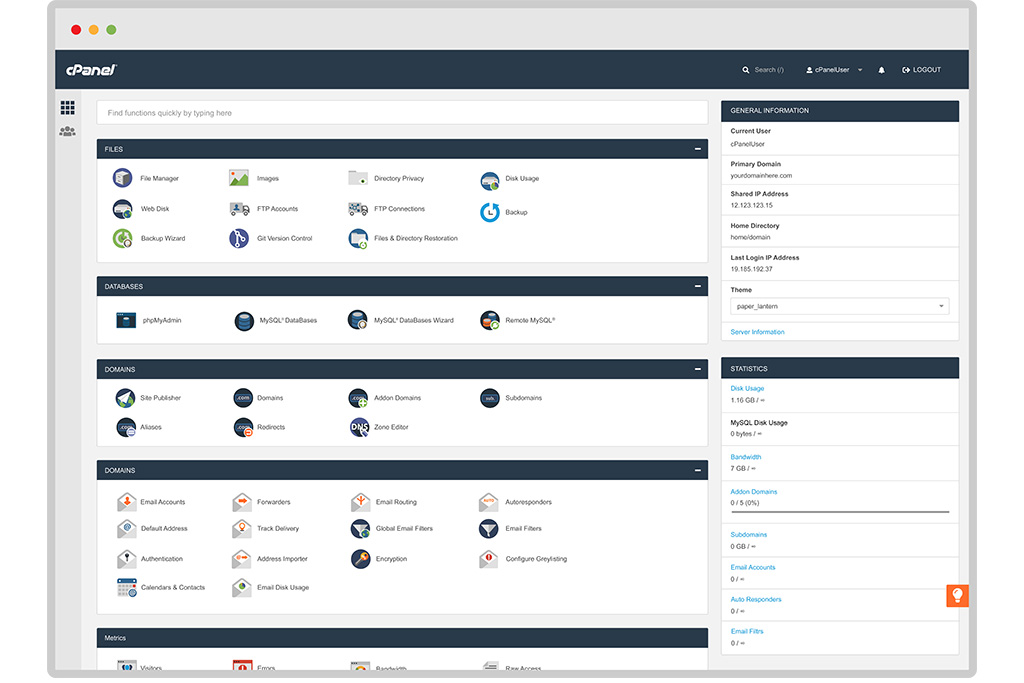
Each of our webspace packages comes preinstalled with cPanel so that you have total control over your website, web hosting, and domains.

cPanel Control Panel
Take full control of your web hosting with the world's most powerful and intuitive dashboard. cPanel's comprehensive feature set makes website management effortless for beginners and developers alike.
#1
Control Panel
1-Click
App Installer
Technical Capabilities Overview
View Optimization TipsFile & Data Management
Advanced file manager, secure FTP access, and direct directory privacy controls.
Corporate Email
Create professional addresses, manage forwarders, and deploy Apache SpamAssassin.
Database Admin
Design and optimize custom databases using MySQL Wizard and phpMyAdmin directly.
1-Click Deployment
Instantly provision and deploy WordPress, Magento, Laravel, and 300+ CMS tools.
Automated Backups
Execute full account backups or partial restorations safely with secure transfer protocols.
Domain Architecture
Manage complex DNS zones, create alias records, and configure add-on domains easily.
Traffic Analytics
Monitor raw access logs, bandwidth usage, and generate detailed AWStats reports.
See cPanel inside out
Take a virtual tour on the official cPanel demo. We know you're going to love it!
Trusted by hundreds of local businesses. Rated 4.9/5 from 140+verified Trustpilot reviews.
Control Panel FAQ
Hosting & cPanel Questions
Everything you need to know about managing your website, emails, databases, and general hosting features via cPanel.
Need technical help?
Can't figure out how to configure something in cPanel? Our expert support team is ready to assist you 24/7.
Open Support Ticket- Upload and manage website files (without using command line).
- Create professional email accounts (like name@yourdomain.com).
- Install applications like WordPress with a single click.
- Manage your domain names, subdomains, and databases.
Simply log into your cPanel, scroll down to the "Software" section, click on "WordPress", and hit the "Install Now" button. Follow the on-screen prompts to set your admin username and password, and your site will be live instantly.
Inside cPanel, go to Email Accounts → Create. You can then access these emails via Webmail (directly from your browser) or connect them to Outlook, Apple Mail, or your smartphone using the provided IMAP/SMTP settings.
Furthermore, you can generate your own manual backups at any time using the Backup Wizard tool inside cPanel, allowing you to download a complete zip file of your account to your local computer.
- File Manager: A built-in cPanel tool that works like a regular file explorer. You can drag and drop files directly into your
public_htmlfolder from your browser. - FTP (File Transfer Protocol): You can create an FTP account in cPanel and use third-party software like FileZilla to securely transfer large amounts of files from your computer to the server.
An Addon Domain functions as an entirely separate website with its own domain name, email addresses, and files, all managed from your single primary cPanel dashboard.
In most cases, the SSL is installed and activated automatically within a few hours of pointing your domain to our servers. If you need to force it manually, you can go to the SSL/TLS Status section in cPanel, select your domain, and click "Run AutoSSL".
Get your business online in Pristina
Partner with the highest-rated digital agency in Kosovo. From custom Web Design to lightning-fast NVMe Web Hosting, our local team is ready to scale your business. Get in touch with us now!
- Web Design
- KS Hosting
- Local SEO